How this started
I recently got a Kindle 8 with a non-working display. After trying to make it work, I gave up on repairing. However, I still wanted to tinker with it and make it run in my Frankenstein-homelab, so what better use to have than a pi zero-type of SBC (it only has one core with 512MB RAM).
Specs of the Kindle 8
A Kindle 8 with a cracked e-ink panel is an i.MX6SoloLite board with 512 MB of RAM, 4 GB of eMMC, WiFi, Bluetooth and a battery. This write-up covers replacing Amazon’s software on such a unit with a mainline Linux 7.3.1 kernel and Alpine Linux, and using it as a small headless server. Nothing in U-Boot was modified; all changes are in raw kernel slots and partitions on the eMMC, and the full original image is kept.
| Device | Amazon Kindle 8th generation (2016), board “Heisenberg”, platform “eanab” |
| SoC | NXP i.MX6SoloLite, single Cortex-A9, PL310 L2 cache (256 KB) |
| Memory | 512 MiB LPDDR2, 3.64 GiB eMMC (Hynix H4G2a) |
| PMIC | ROHM BD71815 (regulators, RTC, charger) |
| Wireless | Broadcom BCM43430/4343W: WiFi on SDIO, Bluetooth on UART |
| Stock software | U-Boot 2014.04, Linux 3.10.53-lab126, firmware 5.16.2.1.1 |
| Result | Linux 7.3.1, Alpine 3.24, WiFi, Bluetooth, battery-backed RTC, battery percentage, e-ink status screen |
Everything here was done over the serial console and the micro-USB port, since the screen couldn’t be used to click anything. Shoutout to the guys at ebookrepairs.com for making this RE easier on the PCB side.
Compared to a Raspberry Pi Zero W
| Kindle 8 (this board) | Raspberry Pi Zero W | |
|---|---|---|
| SoC | NXP i.MX6SoloLite | Broadcom BCM2835 |
| CPU | 1× Cortex-A9 (ARMv7-A, NEON, VFPv3), 996 MHz, 1104 MHz overclocked | 1× ARM1176JZF-S (ARMv6, VFPv2, no NEON), 1 GHz |
| L2 cache | 256 KB PL310 | 128 KB (used by the GPU by default) |
| RAM | 512 MiB LPDDR2 | 512 MB LPDDR2 |
| Storage | 4 GB eMMC (3.64 GiB), soldered | microSD |
| WiFi / Bluetooth | BCM43430 (2.4 GHz 802.11n, Bluetooth 4.1) | CYW43438 (2.4 GHz 802.11n, Bluetooth 4.1), same chip family |
| Display | 6” 800×600 e-ink (EPDC) | mini-HDMI |
| Input | power button, IR touch (zForce, not working yet) | none on board |
| USB | 1× micro-USB OTG, used as USB Ethernet and for charging | 1× micro-USB OTG, plus a separate power-only micro-USB |
| GPIO | none exposed; 1.8 V UART test pads | 40-pin header (3.3 V), unpopulated |
| Camera | none | CSI connector |
| Power | Li-ion battery with PMIC charger, runs without mains | 5 V micro-USB only |
| RTC | yes, in the PMIC, kept by the battery | none |
| Alpine port | armhf installed (armv7 would also run) | armhf only (armv7 needs ARMv7) |
Serial console and a root shell
While trying out the board, I hooked up my trusty Saleae Logic analyzer to take a look how the board boots up. After establishing the baudrate, I used the ESP32 Bit Pirate with the Dock in order to to “talk” to the SoC at 1.8V. Be very careful not to connect a 3.3V to it! It may permanently destroy the SoC!
The board exposes ttymxc0 at 115200 8N1 on test pads near the top edge.
It was connected through an ESP32-based Bus Pirate running as a UART bridge,
which shows up on the PC as /dev/ttyACM0. Pressing a key during the
three-second countdown stops U-Boot at its prompt.
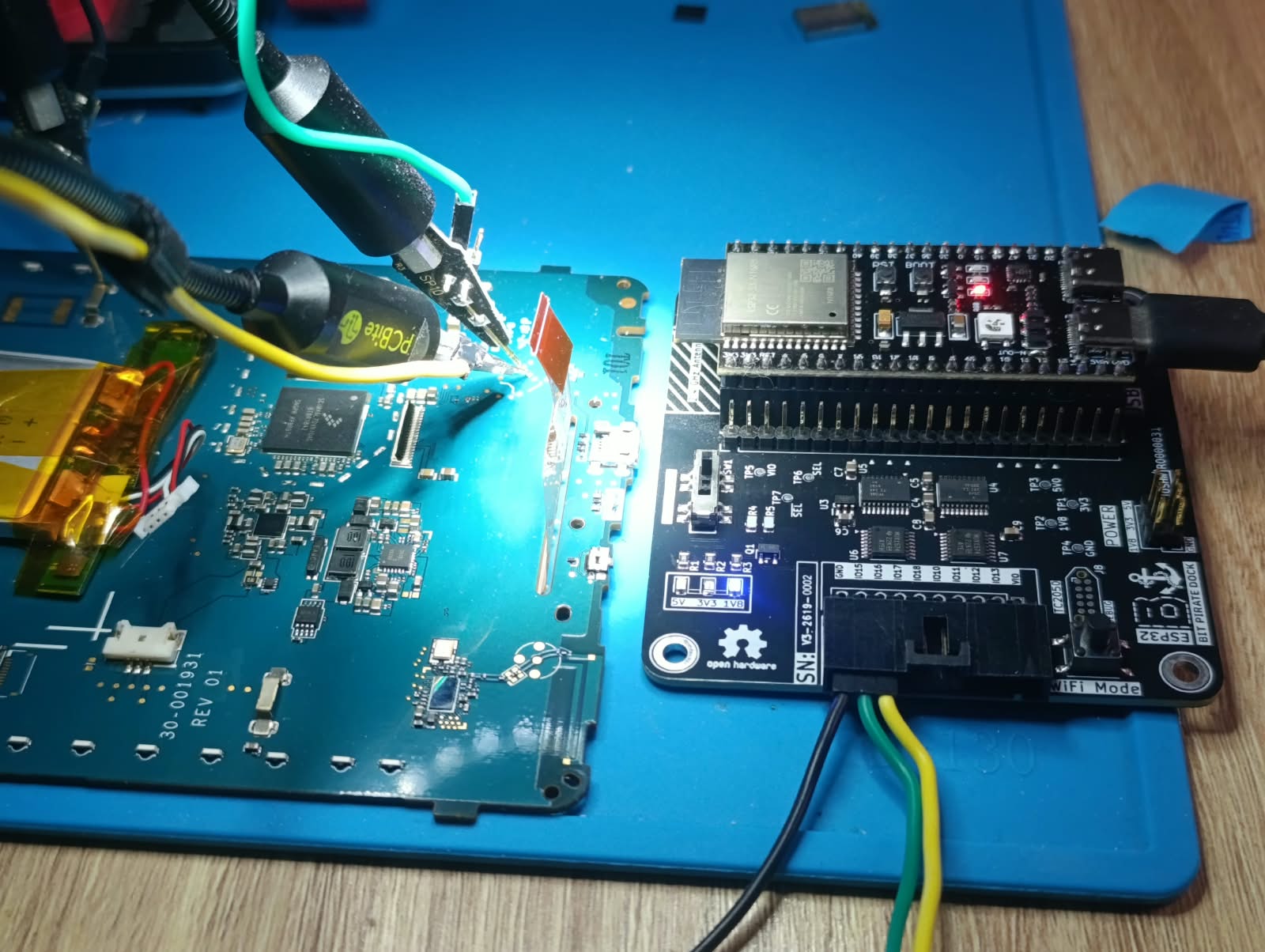
The Kindle 8 mainboard (30-001931 REV 01), with PCBite probes on the UART pads and the ESP32 Bus Pirate dock on the right. The i.MX6SoloLite is the large chip in the middle, the battery on the left.
On the Bus Pirate side this is mode uart with RX on GPIO 15, TX on GPIO 16,
115200 8N1, followed by bridge:
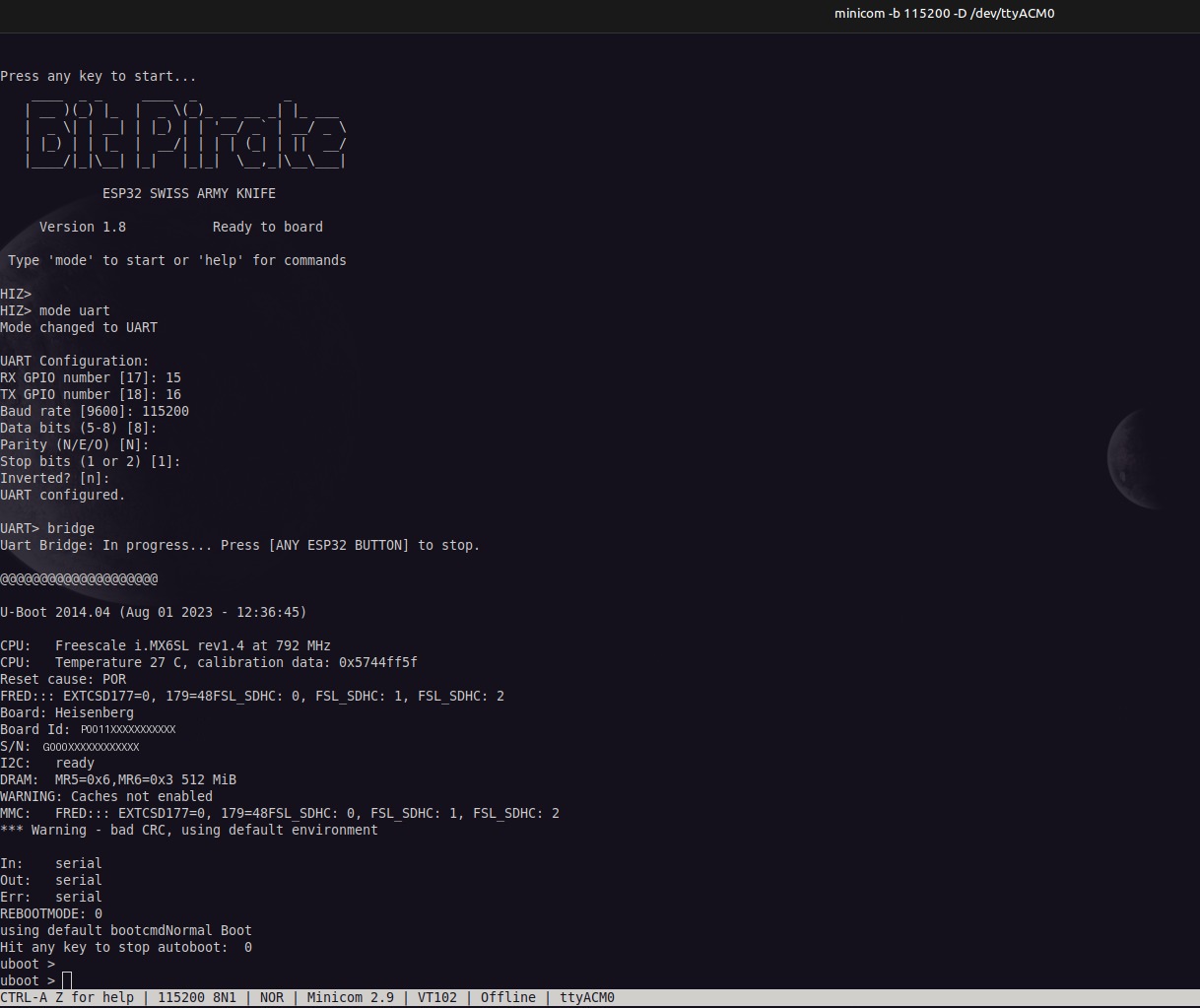
Bus Pirate set to UART bridge mode, then the Kindle’s U-Boot banner and prompt. Board ID and serial number are redacted.
The stock root account is locked (root:! in /etc/shadow), so the
serial login is not usable. U-Boot, however, accepts a modified kernel
command line without saving anything:
run setmmcdev; run loadkernel; run loaddt
setenv bootargs console=ttymxc0,115200 root=/dev/mmcblk0p1 rootwait ro init=/bin/sh
bootm 0x80800000 - 0x83000000
This boots the stock kernel with the root filesystem read-only and a shell
as PID 1. saveenv was never run; the environment already fails its CRC
and U-Boot falls back to defaults on every boot.
One command to avoid on this U-Boot: idme <name> without a value does not
print the variable, it clears it. The idme area holds the board ID and
serial number.
Backing up the eMMC
This U-Boot has no ums or fastboot, and reading 3.6 GB through md
at 115200 baud is not practical. The stock kernel, however, ships
g_mass_storage.ko. From the read-only shell:
mount -t devtmpfs dev /dev
M=/lib/modules/3.10.53-lab126/kernel/drivers/usb/gadget
insmod $M/libcomposite.ko
insmod $M/g_mass_storage.ko file=/dev/mmcblk0,/dev/mmcblk0boot0,/dev/mmcblk0boot1 ro=1,1,1 luns=3
The PC sees three read-only disks, and dd copied the 3.9 GB user area in
110 s (35 MB/s). The read-only flag mattered: the desktop auto-mounted the
ext3 root partition and tried to write its journal when unmounting it,
and the gadget refused.
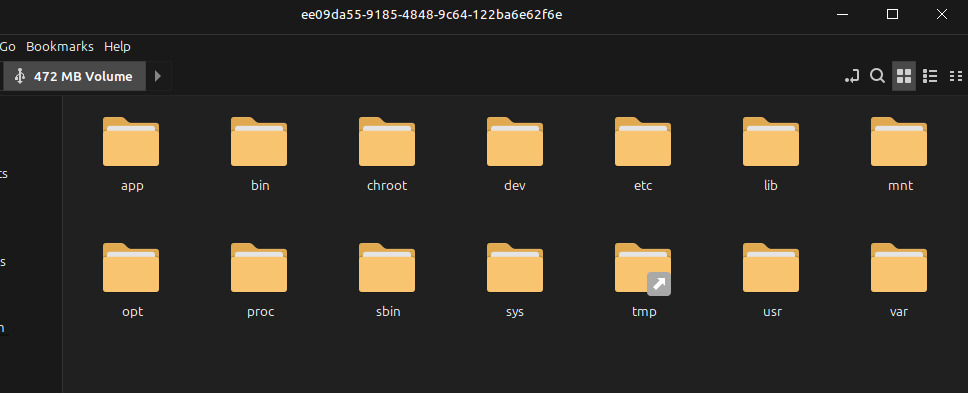
The stock root partition (p1), auto-mounted read-only by the desktop once the eMMC was exported over USB.
What the image contains:
| Region | Contents |
|---|---|
| boot0, offset 0x400 | U-Boot (i.MX IVT); boot1 is empty |
| user area, sector 0x208 / 0x2D0 | device tree / kernel (uImage), loaded by U-Boot’s bootcmd |
| sector 0x7208 / 0x72D0 | a second “diags” kernel and device tree |
| sector 0xE208 onward | data of unknown purpose |
| p1, 450 MiB ext3 | root filesystem |
| p2, 64 MiB ext3 | diagnostics root filesystem |
| p3, 64 MiB ext3 | /var/local: registration, tokens, databases, logs |
| p4, 3 GiB | user storage: a nested MBR with a FAT32 volume 16 sectors in |
The stock kernel contains an embedded config (IKCFG_ST), but its gzip
header has been altered, so it does not decompress. The device tree, the
stock rootfs and the board’s WiFi and Bluetooth firmware files are what
the rest of the work was based on.
Getting test kernels onto the board
The first plan was to load kernels into RAM with U-Boot’s loady. That
failed: U-Boot rejected every YMODEM block, with 128-byte and 1 KB blocks
alike, while plain text passed through the bridge without problems. The
likely cause is that the bridge does not pass arbitrary binary data
unchanged; it was not investigated further.
Instead, test kernels went into the diags slot, which normal boots never read:
- U-Boot boots the stock kernel into the read-only shell.
- The Kindle exports a 14 MiB file in RAM (tmpfs) as a USB disk with its own serial number. A udev rule on the PC makes only that disk writable for the user; the real eMMC is never exported writable.
- The PC writes the device tree and kernel into it. The Kindle checks the
md5, copies it to sectors 0x7208–0xE207 with
dd, and reads it back to check again. - U-Boot boots the slot with
run loaddt_diags; run loadkernel_diags.
Before bootm, the script also starts the SoC watchdog from the U-Boot
prompt:
mw.w 0x020bc000 0x773c # WDOG1 WCR: 60 s timeout, enabled
Once started, the i.MX watchdog cannot be stopped until the next reset. A
test kernel that hangs therefore resets the board after 60 seconds. A
kernel that boots far enough to load imx2_wdt finds the watchdog already
running and keeps it fed. This removed nearly all manual resets.
Device tree and the first boots
The board DTS was written against mainline’s imx6sl.dtsi using the stock
device tree as the reference. Two details are easy to get wrong:
- The stock DT numbers GPIO banks from 0, mainline from 1. The stock
gpio1is mainline&gpio2. - The pad configurations set bit 22 (LVE, 1.8 V low-voltage pads). The
values were copied as-is, and all 22 pinmux entries were checked against
imx6sl-pinfunc.h.
The first stage enabled only the console UART and the eMMC (uSDHC2, 8-bit).
The kernel was built from imx_v6_v7_defconfig, reduced to i.MX6SL, with
XZ compression, DEBUG_LL on UART1 and cpufreq disabled.
| Boot | Change | Result |
|---|---|---|
| 1 | first DTS | stops right after the PL310 L2 controller is enabled |
| 2 | arm,early-bresp-disable, arm,full-line-zero-disable |
gets further; text printed after the L2 enable is corrupted, then a hang |
| 3 | CONFIG_CACHE_L2X0 disabled |
boots to /bin/sh on the stock ext3 rootfs |
Boot 2’s log showed 6L2C-310 dynamic cl enabled, a printk record with
pieces missing and its log-level digit leaking through. That points to
memory returning wrong data once the L2 was on, rather than to a single
bad register write.
The L2 cache
Two more device tree experiments failed: turning off the PL310’s dynamic
clock gating and standby, and setting arm,shared-override as the
i.MX6Q device trees do. Instead of guessing further, the register state of
both kernels was compared.
Running the stock kernel again needed some care. Its built-in initramfs
is a klibc environment with mkdosfs and a recovery tool, and p4 was
about to become an ext4 root that it should not touch. Booting with
rdinit=/nonexistent root=/dev/mmcblk0p1 rootwait init=/bin/sh makes the
kernel skip the initramfs and mount the root partition itself. Busybox
devmem from the stock rootfs then reads the registers. The same script
ran under mainline with the L2 disabled, which shows the state U-Boot left:
| Register | Stock 3.10 | Mainline, L2 off (as U-Boot left it) |
|---|---|---|
| PL310 CTRL | 0x00000001 | 0x00000000 |
| PL310 AUX_CTRL | 0x32030000 | 0x02030000 |
| PL310 TAG/DATA latency | 0x132 / 0x132 | 0x777 / 0x777 |
| PL310 PREFETCH | 0x70800000 | 0x00000000 |
| PL310 POWER | 0x00000003 | 0x00000000 |
| ANATOP PLL_ARM | 0x80002053 (996 MHz) | 0x80002042 (792 MHz) |
| IOMUXC GPR11 | 0x00020000 | 0x00000002 |
The values mainline programs (AUX, latencies, power) already matched the stock kernel. Setting GPR11 to the stock value from U-Boot and copying the stock prefetch configuration made the kernel get further each time, but it still crashed. A debug print before the L2 enable gave the CPU-side state:
heisenberg-l2: ACTLR=0x00000041 MPIDR=0x80000000 SCTLR=0x10c5387d AUX(hw)=0x32030000
...
Unable to handle kernel NULL pointer dereference at virtual address 00000008 when execute
ACTLR=0x41 has the SMP bit set, and MPIDR reports a core that is part
of a multiprocessor cluster. imx_v6_v7_defconfig builds an SMP kernel,
which on this core sets ACTLR.SMP and marks memory as shareable in the
page tables. The stock kernel’s version string (#8 PREEMPT) shows it is a
uniprocessor build. Mainline’s i.MX code enables the snoop control unit
only on the i.MX6Q family, never on the 6SoloLite.
| Test | Change | Result |
|---|---|---|
| F | # CONFIG_SMP is not set (and GPR11 from U-Boot) |
boots with L2 enabled, ACTLR=0x00000000 |
| G | uniprocessor kernel, no GPR11 write | boots; promoted |
A 60-second stress-ng --vm --verify run with two workers reported no
errors. With L2 on, the stress-ng vm test runs about 10 % faster, and
large memcpy throughput is unchanged (23 bogo-ops/s both ways) because
it is limited by DRAM bandwidth. The board has a single core, so the
uniprocessor build loses nothing.
USB networking and SSH
With CONFIG_USB_ETH=y and usbotg1 set to dr_mode = "peripheral", the
micro-USB port becomes a CDC-ECM Ethernet device. The MAC addresses are
fixed on the kernel command line
(g_ether.dev_addr=02:4b:38:00:00:02 g_ether.host_addr=02:4b:38:00:00:01),
so the PC-side interface is always enx024b38000001. A NetworkManager
profile in shared mode gives the PC 192.168.7.1, and NAT and DNS for the
Kindle, without root.
The stock rootfs has no SSH server, so the first SSH session ran from RAM:
- The PC served an Alpine 3.24 armhf minirootfs and the
dropbearpackages over HTTP on the USB link. - The Kindle downloaded them with busybox
wgetinto a tmpfs andchrooted into Alpine. - It installed dropbear offline. apk-tools v3 needs
--force-non-repositoryfor local package files. - Dropbear started with key-only login, using a dedicated key.
A persistent Alpine install, without changing U-Boot
From that RAM system, with internet through the PC, p4 (the old FAT
userstore) was formatted as ext4 and Alpine was installed into it with
apk --root /mnt/p4 --initdb add alpine-base openrc dropbear chrony ….
The install adds a getty on ttymxc0, a static usb0 and key-only
dropbear. The dropbear host key was carried over from the RAM system.
Stock U-Boot’s bootcmd always passes
console=ttymxc0,115200 root=/dev/mmcblk0p1 rootwait rw uart_at_4M.
Rather than change the environment, the kernel in the normal slot is built
with:
CONFIG_CMDLINE="root=/dev/mmcblk0p4 rootwait rw g_ether.dev_addr=... g_ether.host_addr=..."
CONFIG_CMDLINE_EXTEND=y
The kernel appends this string to U-Boot’s arguments. When root= appears
twice, the last value wins, so the unmodified bootloader boots Alpine.
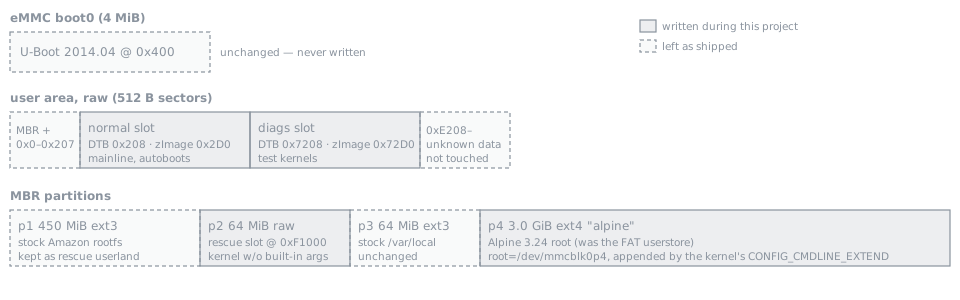
eMMC layout after the conversion (not to scale).
There are three kernel slots, all with the same layout (DTB at +0, uImage at +0xC8 sectors):
- normal (0x208): the current kernel; U-Boot boots it on every power-up.
- diags (0x7208): test kernels.
- rescue (start of p2): the same kernel without the built-in command
line. From the U-Boot prompt it can boot Alpine or the stock rootfs
with
init=/bin/sh.
The stock kernel no longer boots, and its initramfs is no longer in the recovery path.
Kernel work no longer goes through the stock kernel. tools/test-kernel.sh:
- builds the kernel;
- writes it to the diags slot over SSH, checking the md5 on both ends;
- reboots over SSH;
- catches U-Boot on the serial line, starts the watchdog and boots the diags slot once;
- checks that SSH comes back.
If the test kernel hangs, the watchdog resets the board, the script sends
reset at the U-Boot prompt, and the normal slot boots again.
--promote writes a tested kernel to the normal slot.
PMIC: RTC, charger and battery percentage
The BD71815 sits on I2C1 at 0x4b, with its interrupt on &gpio4 20 (pad
FEC_MDIO). Mainline’s rohm-bd71828 MFD supports it. The DT node has an
empty regulators {} node on purpose. Without constraints, the regulator
core lists the outputs but will not change or turn off any of them, and
those outputs include the DDR, ARM and SoC supplies.
The PMIC’s RTC is battery-backed and registers as rtc0, ahead of the
SoC’s SNVS RTC. The kernel sets the system time from it at boot, and
chrony’s rtcsync keeps it updated. Charger and battery readings come from
bd71828-power: DC-in 4.985 V, battery 4.17 V, status, health and
temperature.
That driver does not report a charge percentage. The vendor’s software
fuel gauge was never merged. A small kernel patch,
kernel/patches/0001-power-bd71828-report-capacity-from-ocv-table.patch,
adds POWER_SUPPLY_PROP_CAPACITY from a simple-battery node:
- the battery
power_supplyuses the PMIC’s DT node, so it findsmonitored-battery; power_supply_get_battery_info()reads the OCV table and internal resistance;- capacity =
power_supply_batinfo_ocv2cap(V_bat − I_avg · R_i).
The OCV table is a generic LiCoO2 curve and has not been calibrated on
this cell, so the value is an estimate. Along the way: bd71815_get_temp()
returns whole degrees Celsius, while the power-supply ABI expects tenths.
WiFi
The BCM43430 is on uSDHC1, 4-bit SDIO. The stock device tree only names its
GPIOs (wl_reg_on, wl_host_wake). In mainline terms that is an
mmc-pwrseq-simple with reset-gpios = <&gpio2 15 GPIO_ACTIVE_LOW> and
the PMIC’s 32 kHz output as ext_clock, plus a brcm,bcm4329-fmac child
node. The card enumerated (02d0:a9a6) on the first boot.
brcmfmac is built as a module, because a built-in driver would request
its firmware before the root filesystem is mounted. The firmware is
Alpine’s linux-firmware-brcm (Cypress 7.45.98.118). The board calibration
file is the stock nvram.txt, installed as
brcmfmac43430-sdio.amazon,heisenberg.txt; brcmfmac derives that name from
the DT compatible. Three issues came up:
- Alpine ships firmware zstd-compressed. The kernel needs
CONFIG_FW_LOADER_COMPRESS_ZSTD. - The stock nvram contains Broadcom’s default MAC address, so the driver picked a random one on each boot. A fixed locally administered address is written into the installed copy.
- With power saving enabled, the Kindle could reach the network but
nothing could reach the Kindle: ARP requests from the LAN went
unanswered.
iw dev wlan0 set power_save offruns when the interface comes up.
The WPA key is stored as a PSK hash derived on the PC. The plaintext passphrase is not on the device. Measured link: −42 dBm, 72.2 Mbit/s (802.11n, one stream), about 6 ms to a wired host on the same LAN.
Bluetooth
Bluetooth is on UART3 (ttymxc2) with RTS/CTS; the stock btd starts
bsa_server -d /dev/ttymxc2 on the same port. In mainline it is a serdev
brcm,bcm43430a1-bt node:
shutdown-gpiosBT_REG_ON,&gpio2 19device-wakeup-gpios,&gpio5 10- the PMIC’s 32 kHz clock as
lpo
With the generic BCM43430A1.hcd from linux-firmware, the chip answered,
accepted the patch, and then stopped responding
(command 0xfc18 tx timeout). The stock rootfs has Amazon’s own patch
files. With
BCM4343A1_001.002.009.0152.0517.hcd installed as
brcm/BCM43430A1.amazon,heisenberg.hcd, the controller identifies as
BCM4343A1 26MHz Class 1.5 Amazon eReader-0152 and works with BlueZ.
Patch files are specific to the reference crystal, and this board uses a
26 MHz one.
Keeping the USB link up
After the PC rebooted, the USB link stayed down: the Kindle still reported
the gadget as configured, but the PC never answered ARP. A small service
on the Kindle (usb-link-watchdog) probes 192.168.7.1 with arping
every 20 seconds. After three misses, while a host is attached, it toggles
/sys/class/udc/ci_hdrc.0/soft_connect. The PC re-enumerates the device,
and NetworkManager reactivates the profile. Retries back off exponentially
up to 30 minutes. In a test with the PC side taken down by hand, the link
came back in 59 seconds.
A small web server
With Python from apk, a short standard-library script serves a status page
on port 80: kernel, uptime, load, memory, disk, SoC temperature, battery and
WiFi signal, refreshed every 10 seconds. The same data is at /status.json,
and any other path serves files from /srv/www. It runs under OpenRC as the
unprivileged user www; the only capability it gets is
CAP_NET_BIND_SERVICE, so it can bind port 80 without root. Details are in
docs/web-server.md.
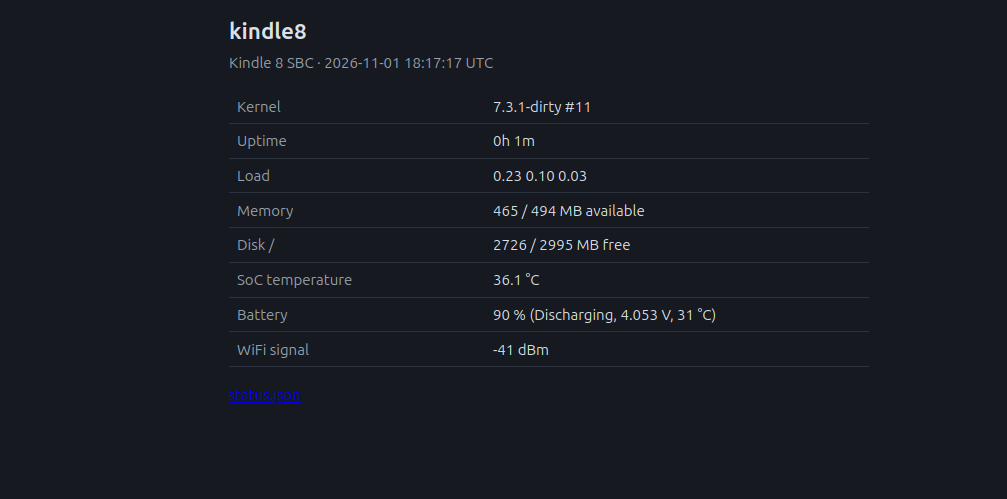
The status page at http://kindle8.local/, running on battery a minute
after boot.
The SoC temperature comes from the thermal zone of type imx_thermal_zone.
Zone 0 is the battery’s, and it reads ten times too low because of the
BD71815 temperature unit issue described above.
The e-ink panel
The panel was assumed dead, but after a bit of research it turned out to only be partially cracked. Plugged back into its FPC connector, it could be brought up under mainline too. Three pieces were missing: a driver for the panel’s power chip, a display controller driver, and the panel-specific data.
Finding the facts. The e-ink power chip is a FitiPower FP9928 on I2C1 at 0x48. The stock driver for it lives
inside Amazon’s mxc_epdc_fb.ko; disassembling it showed which registers it uses: 0x00 for the panel temperature
and 0x02 for VCOM. The enable pins are set from Amazon’s board code inside the kernel image, so they came from
Amazon’s GPL source release for this exact firmware build (Kindle_src_5.16.2.1.1_4097490002.tar.gz, listed as
“Kindle (8th Generation)”):
#define MX6SL_PIN_PM_EPD_EN    IMX_GPIO_NR(3, 25)  /* KEY_ROW0: high-voltage rails */
#define MX6SL_PIN_PM_EPD_ENOP  IMX_GPIO_NR(3, 27)  /* KEY_ROW1: VCOM output        */
The same source gave the VCOM conversion (116 - (2500 - mV) / 21; this panel’s 2860 mV becomes 133) and the
panel timing. The waveform, the panel-specific table of voltage sequences, was in the region at eMMC sector
0xE208 that the slot layout had been avoiding: a small FAT filesystem holding
V220_C295_BDCE01_ED060SCSC1_TC.wrf.gz for the 800×600 ED060SCSC1 panel. Amazon’s update scripts reformat that
region if they fail to mount it.
Before any kernel change, the stock temperature read was reproduced from userspace: raise PM_EPD_EN, read register 0x00, lower it. The FP9928 answered with 27 °C from the panel’s thermistor, so the FPC and the panel’s sense line were intact.
Power chip driver. Mainline has a driver for the related FP9931, but it is not register-compatible: on the
FP9931, register 0x02 sets the high-voltage rails, while on the FP9928 it is VCOM. A new fp9928 regulator
driver (kernel/patches/0002) follows the vendor sequence. EN powers the chip and the ±HV rails, and VCOM is
rewritten after every power-up, because the chip forgets it while EN is low. A second GPIO switches the VCOM
output, and hwmon reports the temperature. No other register is written, since the FP9928’s rail voltage
register is not documented.
Display controller driver. The i.MX EPDC driver is Andreas Kemnade’s DRM driver
(RFC), taken from the newest branch of his tree
(kobo/epdc-drm-6.8). It needed three API updates for 7.3: fbdev emulation through drm_client_setup(), the
removed drm_driver.date field, and remove() returning void (kernel/patches/0003). Amazon’s .wrf turned out to
be in the EPDC firmware format the driver loads, so the panel’s own waveform is installed unchanged as
imx/epdc/epdc.fw. The first test pattern came out correctly, rotated by 90° because of how the panel is mounted.
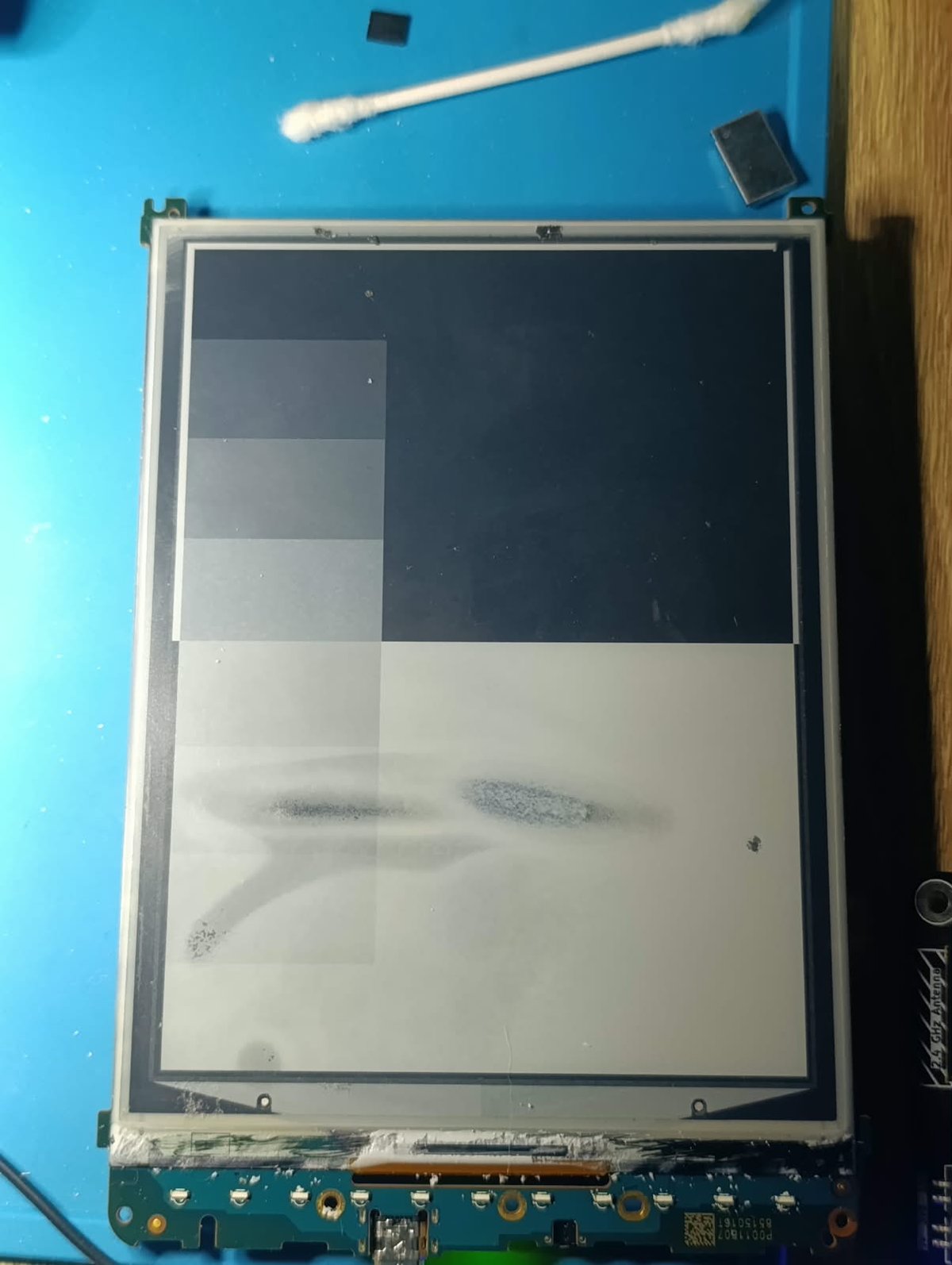
First image under Linux 7.3: black, white and an 8-step grey ramp. The dark smudges are cracks in the panel and stay in the same place regardless of content.
The Linux text console also attached to the framebuffer, and its blinking cursor kept the panel refreshing continuously, with the high voltage on the whole time (over 7000 EPDC interrupts). With the console detached, an update costs two interrupts, and the driver switches HV and VCOM off right after it.
A small service (kindle-eink) renders the same data as the web server into a portrait image with Pillow,
rotates it to the panel’s native orientation, and writes it to /dev/fb0 on every minute. The layout leaves
the cracked band of the panel empty.
The EPDC driver sends each damaged area as a partial GC16 update, so the service writes only the framebuffer
rows that changed since the last frame: a minute tick redraws the clock and costs two interrupts, without a
full-screen flash. Partial updates leave faint ghosting, so once an hour (EINK_CLEAN_MIN in
/etc/conf.d/kindle-eink) the panel gets a black and a white frame before the next image.
eink-say puts arbitrary text on the panel instead of the status page. It wraps the text and picks the
largest font that fits the 600×800 area, keeps short texts above the cracked band, and keeps columns intact
with --mono:
eink-say "Backup running"                  # until cleared
eink-say -t "Build" -c "OK at 14:02"       # title, centred
eink-say --for 10m "Back in 10 minutes"    # then the status page returns
df -h / | eink-say --mono -t Disk          # stdin, monospace
eink-say --clear                           # status page
eink-say --refresh                         # clean refresh now
The message is stored in /var/lib/kindle-eink/message.json and shown by the service, which keeps a small
footer with hostname, IP and time on it.
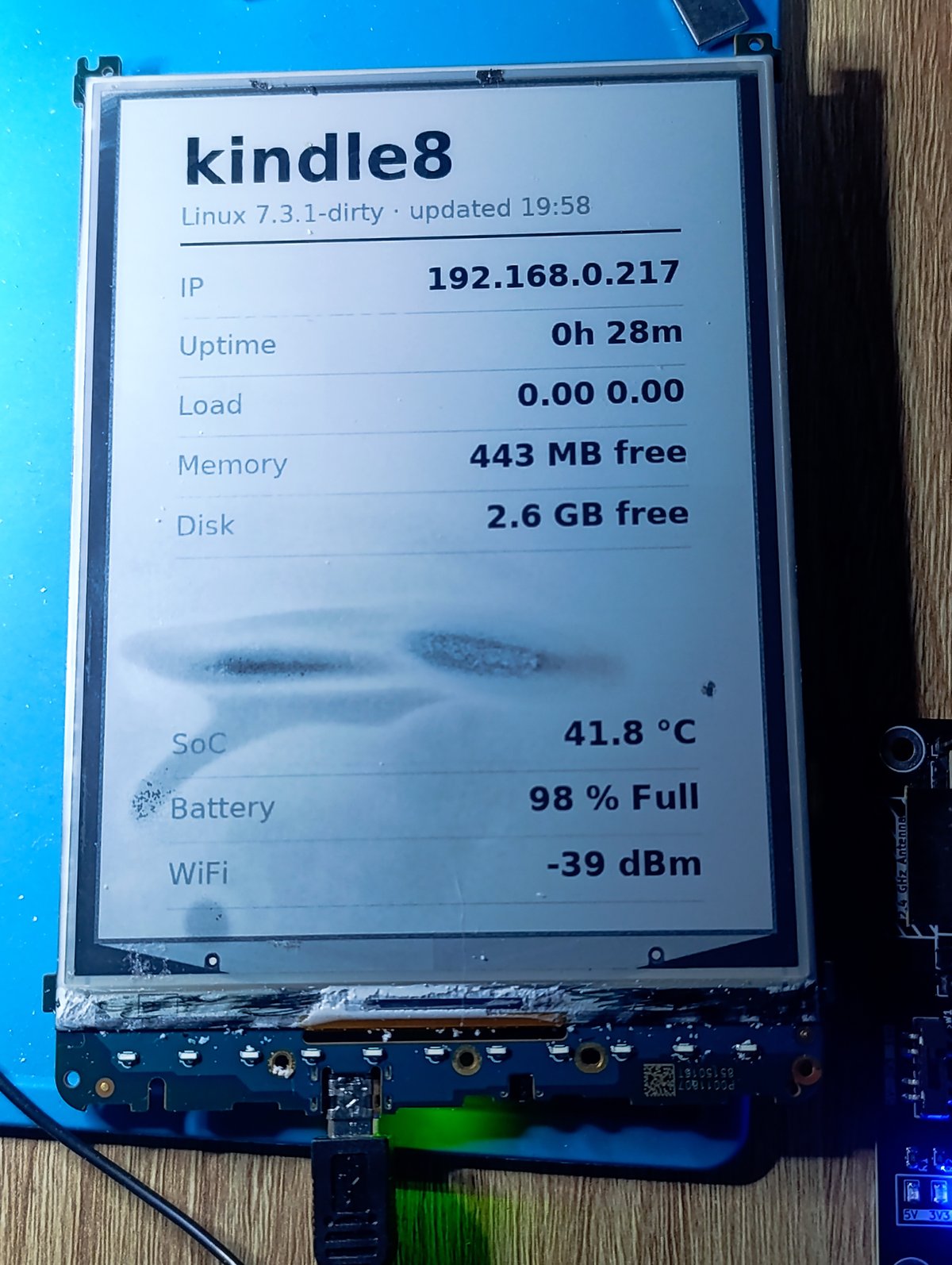
The status screen on the panel. The rows are laid out around the cracked band, which stays blank between “Disk” and “SoC”.
WiFi setup without a screen to tap
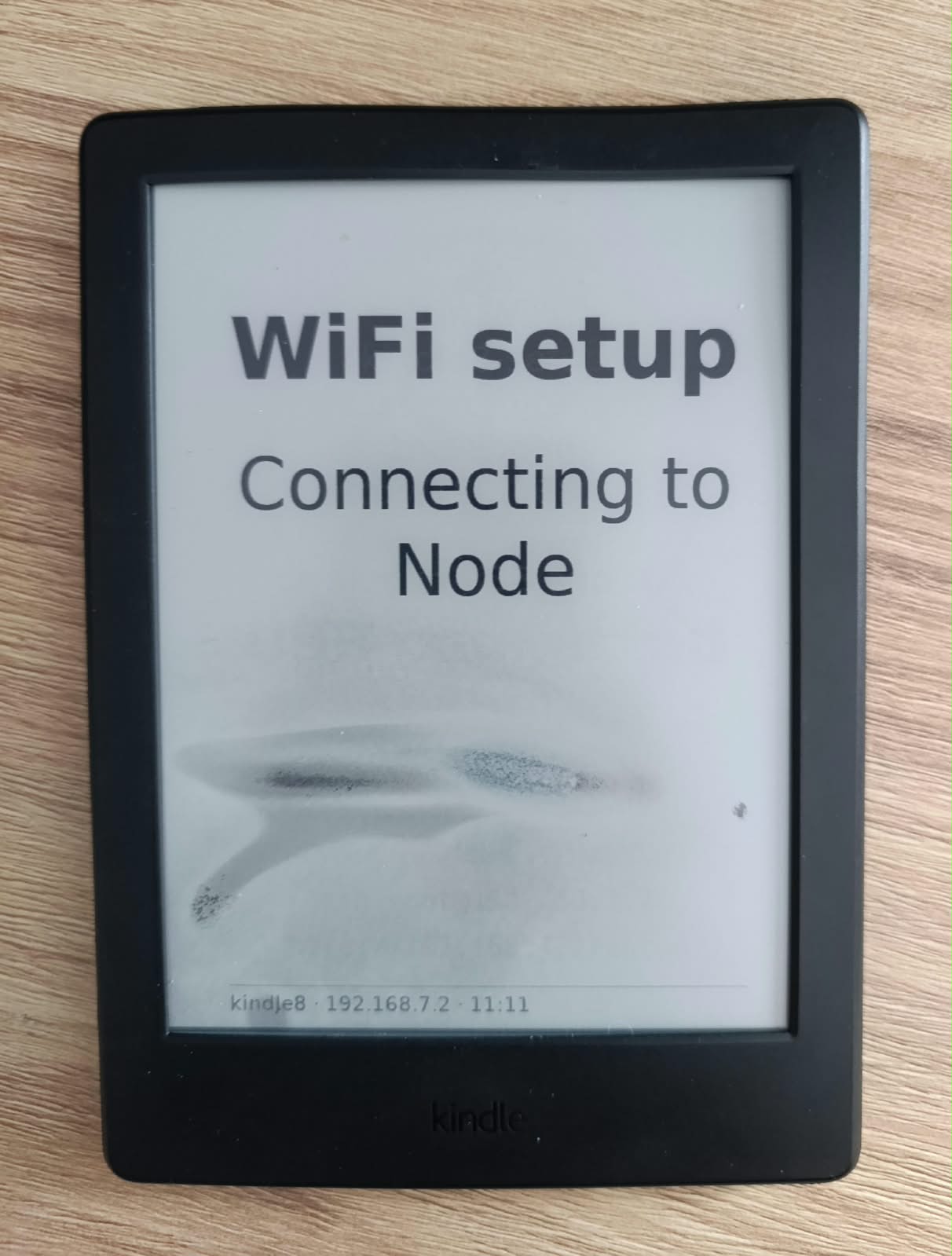
With no keyboard and no touch, a new WiFi network has to come from somewhere else. wifi-setupd handles
it: when no WiFi connects within 90 s of boot, or the connection has been gone for 5 minutes, the Kindle
scans, turns wlan0 into an access point (hostapd, WPA2 with a random password) and runs dnsmasq as DHCP
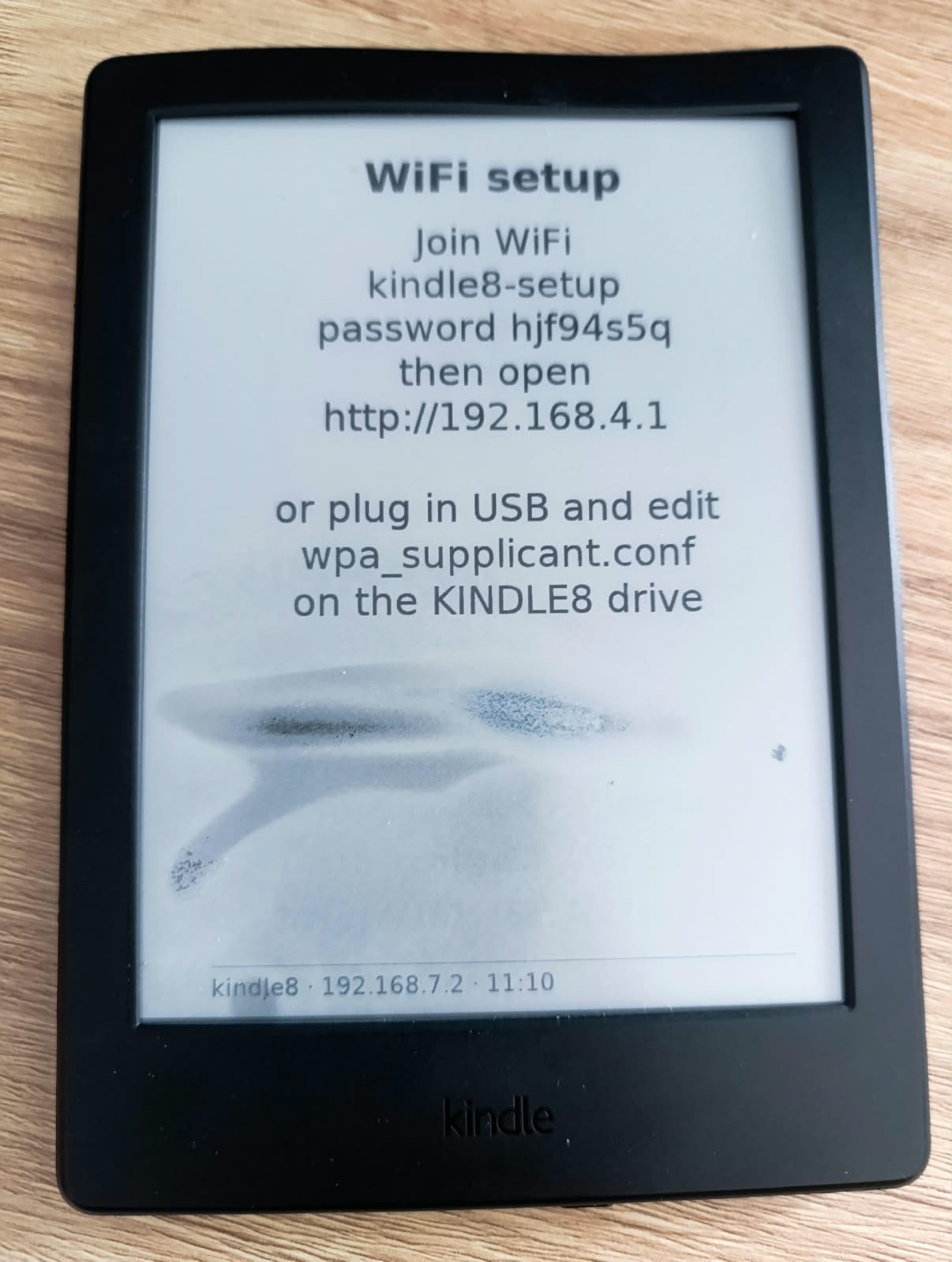
and captive-portal DNS. The panel shows how to join. The page lists the scanned networks; the choice is
stored in wpa_supplicant.conf with the hashed key only, and a wrong password brings the setup network
back with the error. Without any client for 15 minutes it retries the stored network.
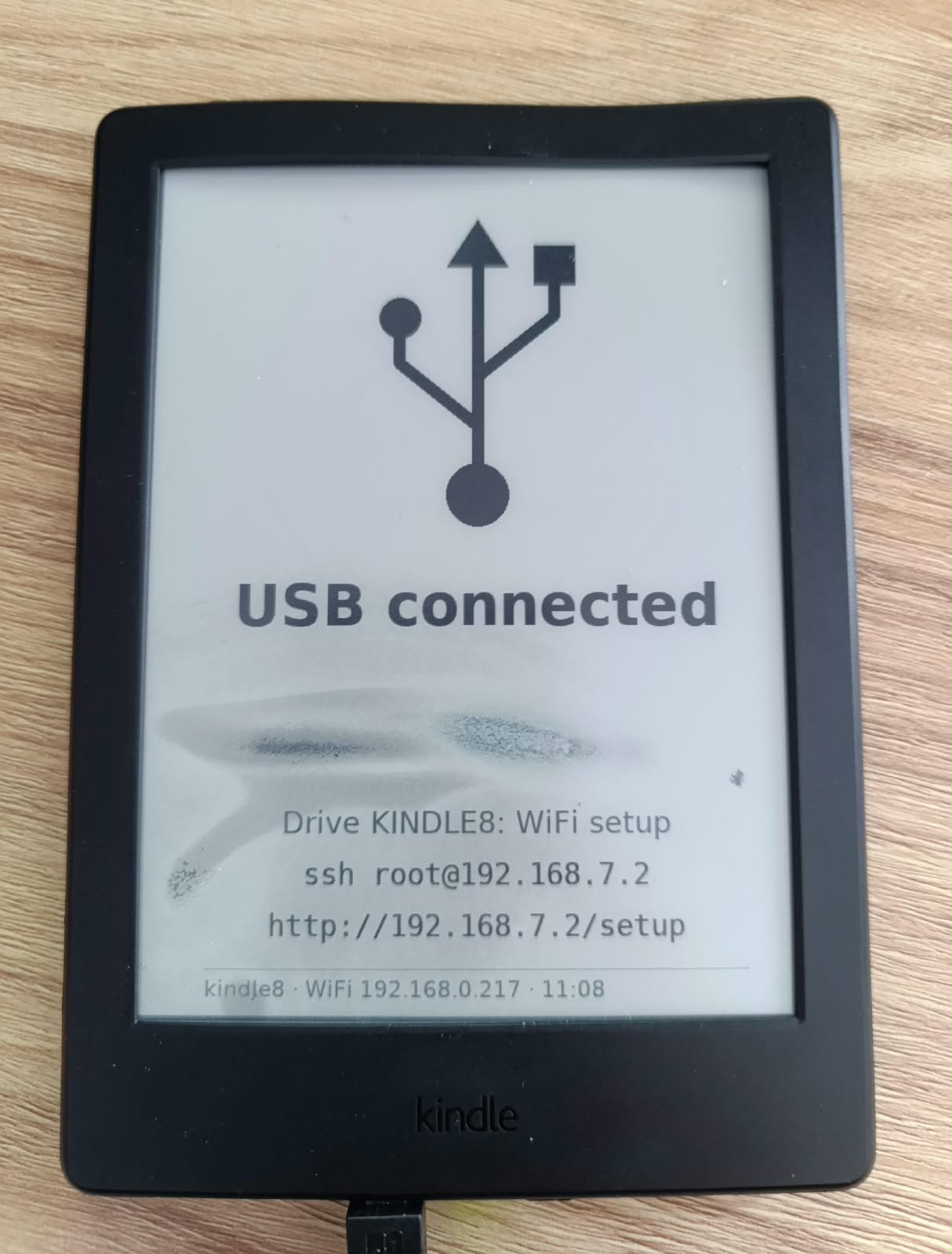
The USB port works as on a Raspberry Pi: the gadget is now a configfs composite of the USB Ethernet link
and a 4 MB FAT drive, KINDLE8. Saving a filled-in wpa_supplicant.conf on it applies the network; the
result goes to STATUS.TXT and the file is reset so the password does not stay on the drive. Details in
docs/wifi-setup.md.
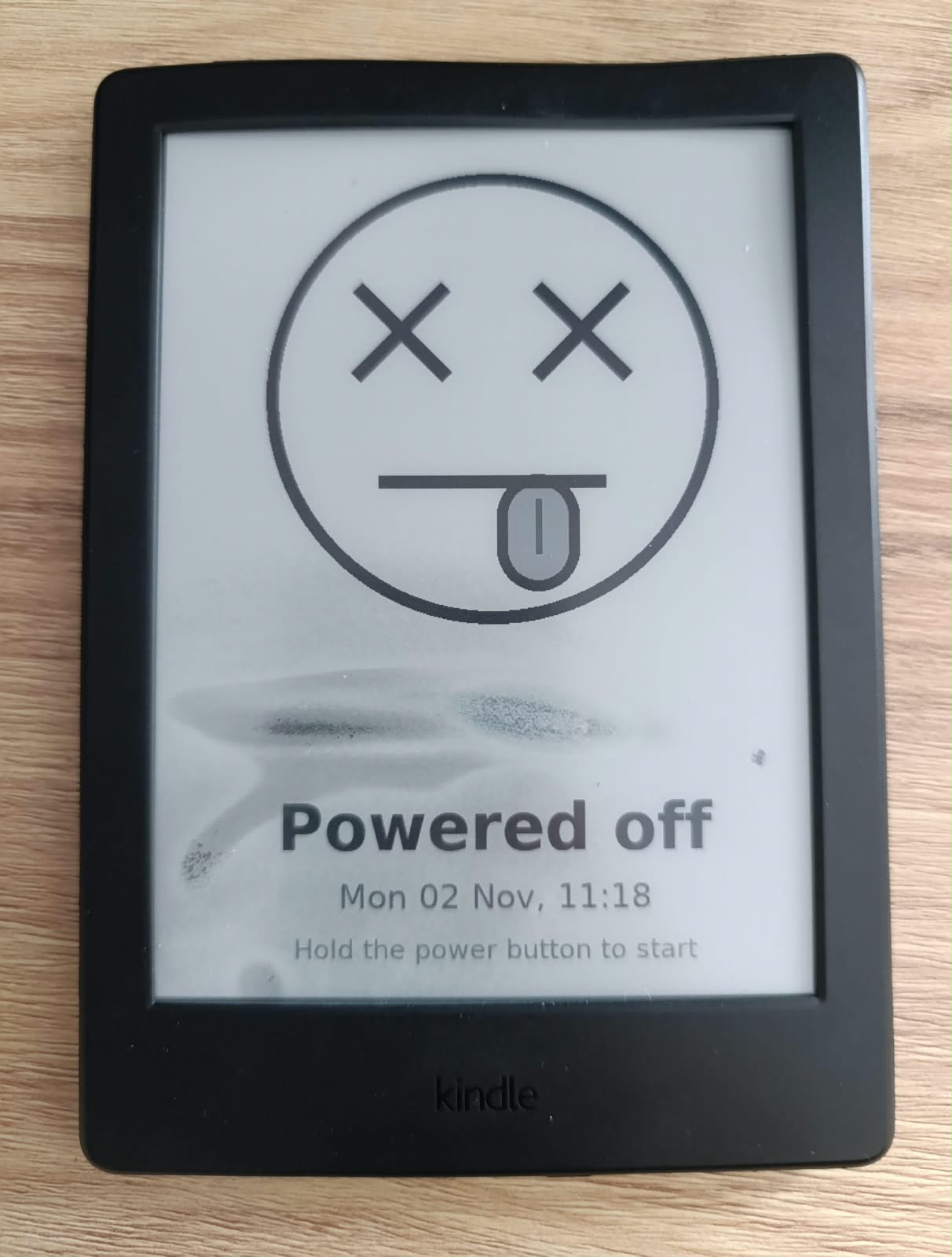
| 1. No WiFi | 2. Network chosen | Or: over USB | Shutdown |
|---|---|---|---|
 |
 |
 |
 |
The Kindle opens its own network kindle8-setup. A phone that joins it is sent to the setup page by the captive-portal check. |
After the form is sent, the setup network goes away and the Kindle joins the chosen one (12 s in the test). The new IP stays on the panel for a minute, then the status page returns. | When a PC attaches, the panel shows the USB link and the KINDLE8 drive for 3 minutes. http://192.168.7.2/setup works over the cable at any time. |
After poweroff or the power button, the last image is this face and the time it went off. The panel keeps it without power. |
The shutdown screen exists because e-ink keeps its last image without power: without it, a board that is off looks exactly like one that is still running.
CPU frequency
U-Boot leaves the Cortex-A9 at 792 MHz. With the uniprocessor kernel and the L2 enabled, mainline’s
imx6q-cpufreq runs the imx6sl.dtsi operating points through the SoC’s internal LDOs: 996 MHz at 1.275 V,
and down to 396 MHz when idle. This chip’s speed-grade fuse says 996 MHz. An extra 1104 MHz point at 1.3 V, the
VDD_ARM_CAP maximum, passed a 10-minute stress-ng --verify run with all CPU methods plus a memory test,
peaking at 48.1 °C, and is now the default (kernel/overclock-1104.dtsi). It is outside NXP’s rating.
y-cruncher has no 32-bit ARM build, so the benchmark is π to 3000 digits with bc on one core. The digits from
every run are hashed and compared with the same computation on a PC. They matched at all four frequencies.
Time to compute π to 3000 digits. Lower is faster.
| CPU | π, 3000 digits | vs 996 MHz | sysbench primes |
|---|---|---|---|
| 396 MHz (idle) | 302 s | +110 % | 6.71 /s |
| 792 MHz (U-Boot default) | 170 s | +18 % | 13.50 /s |
| 996 MHz (rated) | 144 s | — | 16.80 /s |
| 1104 MHz (overclock) | 132 s | −8 % | 18.18 /s |
Purely compute-bound code scales with the clock (stress-ng int64: +26 % from 792 to 996 MHz). Code that
mostly waits on memory gains less, because DRAM speed does not change (matrix multiply: +7.5 %).
Deep suspend
Deep suspend (mem) went down cleanly but never came back; the last console line was Calling
cpu_pm_suspend. pm_test=devices and pm_test=core passed, and so did standby, which wakes on the same SNVS
RTC alarm. So the drivers and the wake path were fine, and the problem was in the power-off part of deep mode.
There the i.MX asserts PMIC_STBY_REQ, and the BD71815 switches to its SUSPEND state, where every output has
its own enable bit. Reading them showed buck2, which feeds VDD_ARM_IN, switched off in SUSPEND
(BUCK2_MODE = 0x04). On wake, the i.MX6SL (CLPCR.BYPASS_PMIC_READY) powers the ARM core up after a fixed
delay without waiting for the PMIC, so the core starts without a supply. Setting the SUSP_ON bit by hand
(i2cset -f -y 0 0x4b 0x03 0x05) made deep suspend resume. The permanent fix is a buck2 node in the DTS with
rohm,dvs-suspend-voltage = <1300000>, which makes the regulator driver keep buck2 on in SUSPEND at its run
voltage. Details in docs/suspend.md.
Power button
Mainline’s BD71828 MFD driver also covers the BD71815, but it registered
neither the power-button interrupts nor a power-off handler for it. The
vendor BD7181x driver reports the button in INT_STAT_03 bits 2–5 (long,
mid, short, press). Patch 0005 adds these interrupts, and the short push
becomes a KEY_POWER input device. Patch 0006 adds pm_power_off, following
the vendor bd7181x_chip_poweroff(): restore the BUCK1/BUCK2 voltage
registers, stop the coulomb counter, then write PWRCTRL 0x22 and 0x23.
Userspace is busybox acpid, whose stock Alpine action
/etc/acpi/PWRF/00000080 runs poweroff. The resulting behaviour:
| Action | Result |
|---|---|
| short press while running | clean shutdown, PMIC cuts all rails (also with the charger connected) |
| press of about a second while off | PMIC powers up, normal boot |
| short tap while off | nothing |
| long hold | PMIC hardware power cycle (Reset cause: POR), independent of Linux |
The charge LED is driven by the PMIC’s charger hardware and is not controlled from Linux (amber while charging, green when full).
Current state
| Function | Status |
|---|---|
| Boot | stock U-Boot → Linux 7.3.1 (uniprocessor, L2 on) → Alpine 3.24 on p4, SSH after about 20 s |
| CPU | 396–1104 MHz (cpufreq, ondemand); 1104 MHz is an overclock, see docs/cpufreq.md |
| Storage | eMMC 8-bit HS-DDR; ext4 root, 2.7 GB free |
| Network | WiFi (brcmfmac) with mDNS kindle8.local; USB Ethernet with automatic recovery |
| Bluetooth | BCM43430A1 via hci_uart/btbcm, BlueZ |
| Power | BD71815: RTC, charger and battery readings, capacity estimate, power button and power-off |
| Display | e-ink 800×600 via FP9928 + EPDC (mxc-epdc), status screen every minute, eink-say for messages |
| Watchdog | imx2_wdt |
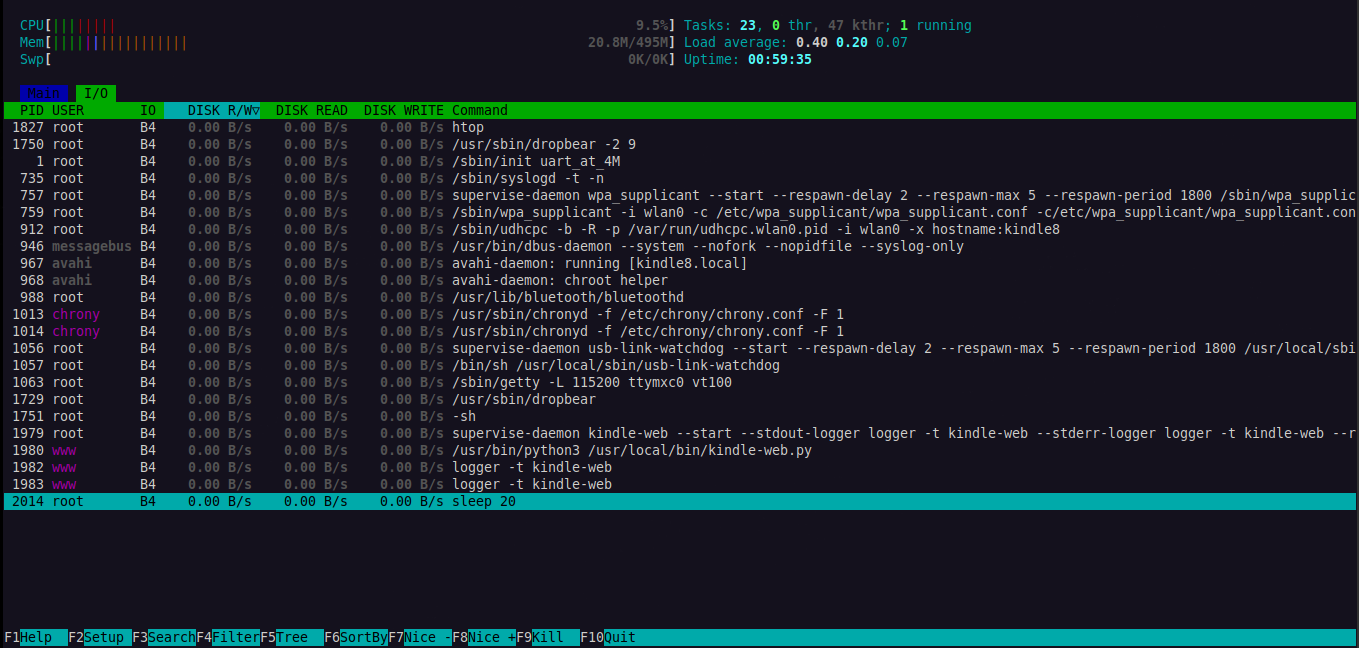
htop on the running system: about 21 MB of 495 MB RAM in use with WiFi,
Bluetooth, mDNS, chrony, dropbear, the USB link watchdog and the port 80
web server all running.
Open items
- The battery OCV table needs calibration from a full discharge (logger and table builder are in place, see
docs/battery.md). - Suspend works (deep and standby, timed wake via the SNVS RTC). Lower suspend voltages are not done
yet, see
docs/suspend.md. The power button is used for power on/off only, not as a wake source. - The cover hall sensor (GPIO4_IO16,
SW_LID) is described in the DT but did not react to a magnet; untested. - Touch: the zForce controller (TI MSP430 + Neonode NN1101, I2C2 @0x51) works with mainline
zforce_tsand its IR LEDs fire, but every photodiode reads 0, so no touches are detected. Most likely receiver-side hardware damage, seedocs/touch.md. This model has no front light; the PMIC’s WLED output is unconnected (docs/peripherals.md).
Reproducing
The repository contains the board DTS, the kernel config fragments, the patch and the tools. It does not contain the eMMC dump or any Amazon firmware; those come from your own device.
git clone --depth 1 --branch v7.3.1 https://git.kernel.org/pub/scm/linux/kernel/git/stable/linux.git build/linux
kernel/build.sh                    # normal variant -> build/out/
VARIANT=rescue kernel/build.sh     # rescue variant -> build/out-rescue/
tools/flash-slot.sh diags          # over SSH, once a mainline system is running
tools/test-kernel.sh [--promote]
Getting to the first SSH session (dump, staging, in-RAM Alpine) is
documented step by step in docs/. The slot layout and recovery
procedure are in docs/boot-slots.md.
Notes
All work was done on hardware I own. The eMMC image and Amazon’s binaries (firmware, Bluetooth patches, nvram) are not distributed here. The device’s serial number and board ID have been redacted from the logs and screenshots.